
Starting an E‑Commerce Business: A Step‑By‑Step Guide
Launching an online store is more accessible than ever, yet success requires more than adding products and waiting for sales. With nearly three-quarters of businesses already operating websites and 28 percent of commerce being conducted online, e‑commerce is no longer a trend, it’s the new norm. This guide walks you through every stage of starting an e‑commerce venture, from market research to marketing and optimization, so you can build a resilient business that attracts customers and converts them into loyal fans.
1- Research your market and choose your niche
Before ordering inventory or buying a domain, validate that people want what you plan to sell. Study search trends and competitor offerings to identify gaps in the market. Consider your passions and strengths, running a store takes dedication, so choose a niche you’re happy to spend time on.
Next, identify your target customer: Who are they? What problems are they trying to solve? How much are they willing to pay? Build buyer personas and use them to shape your product selection and marketing.
2- Select a business model and structure
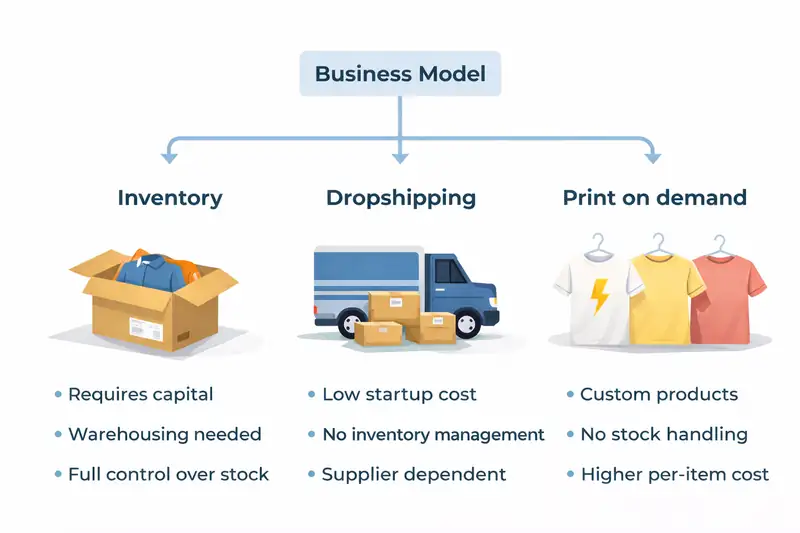
E‑commerce offers flexibility. Choose between holding inventory (buying wholesale or manufacturing), drop shipping (selling products that your supplier ships directly), or print on demand (custom items produced on order). Each model has different capital requirements and profit margins.
Formally structure your business. Register an LLC or corporation to protect personal assets and register for sales tax. Decide whether you’ll trade under a business name or your personal name, and obtain any necessary permits or licenses.
3- Choose the right e‑commerce platform
Your platform powers everything from your storefront design to your payment processing. Compare hosted solutions like Shopify and BigCommerce with self‑hosted platforms like WooCommerce on WordPress or open source alternatives. Hosted platforms simplify setup and include hosting and security, while self hosted options offer more customization and control.
Consider costs (subscription fees vs. hosting), technical requirements, scalability, and integrations with marketing tools. Select a platform that supports your business model today and can scale as your product catalog and traffic grow.
4- Build your store and craft a great user experience
Register a domain name and set up hosting if needed. Design your site around your target audience: use clear navigation, high‑resolution product photos, persuasive copy, and visible calls to action. With more than half of North American web traffic now coming from mobile devices, ensure your store is responsive and easy to use on phones and tablets.
Page speed matters: visitors form an opinion of your website in just 0.05 seconds, and nearly half will leave if it takes more than two seconds to load. Optimize images, enable caching, and choose a reliable hosting environment.
Write concise product descriptions that highlight benefits and include keywords people search for. Encourage trust by adding customer reviews and displaying security badges. Consider adding a blog to share helpful content that attracts organic traffic and builds authority.
5- Set up Payments, Shipping, and Logistics
Allow customers to pay in their preferred way. Integrate payment gateways like Stripe, PayPal, Apple Pay, or buy now, pay later options. Provide transparent shipping rates and delivery time estimates during checkout. Offering free shipping over a certain order value can boost average order size.
Choose carriers (USPS, UPS, FedEx, DHL) based on your product sizes, shipping zones, and budget. Create streamlined processes for fulfilling orders: decide whether you’ll ship in house, use a fulfillment partner, or rely on your drop ship suppliers. Make returns simple to build trust and encourage purchases.
6- Market your Store and Drive Traffic
Attracting visitors requires a multi channel marketing plan. Begin with search engine optimization (SEO) so your site appears when people search for products like yours. Use keyword research to target buying intent and optimize product titles, descriptions, and metadata. Businesses invest heavily in website performance and SEO because it delivers high ROI, data shows that SEO can yield returns around 700% while paid search returns are far lower.
Leverage social media: with 63.9 percent of the world’s population active on social media, and many people spending more than two hours per day on these networks, platforms like Instagram, TikTok, and Pinterest are powerful drivers of brand discovery. Share behind‑the‑scenes content, run giveaways, and collaborate with influencers. Encourage user generated content by reposting customer photos or reviews.
Invest in pay per click (PPC) ads and shopping campaigns for quick visibility, but balance them with organic efforts. Email marketing remains one of the highest ROI channels, marketers report an average return of $36 for every $1 spent. Build your email list with pop‑ups offering discounts or free resources and segment subscribers to deliver targeted offers.
7- Optimize for Conversions and Customer Loyalty
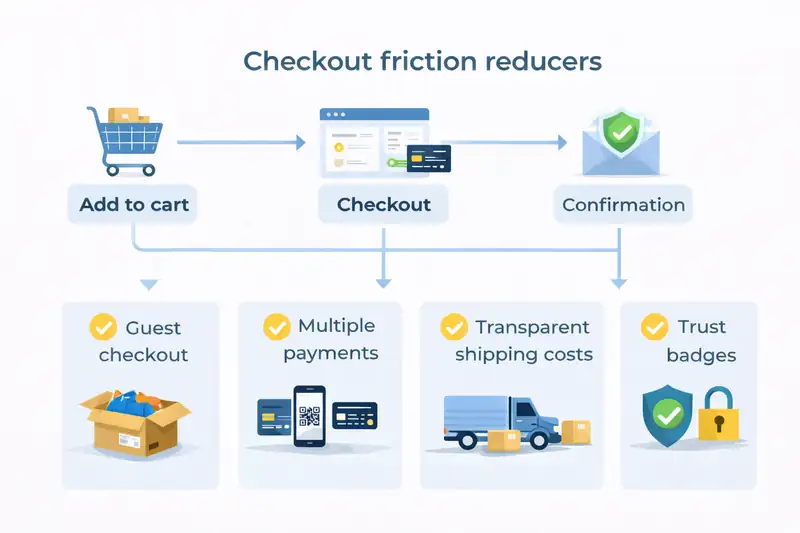
A typical e‑commerce conversion rate ranges between two and four percent. Boost yours by reducing friction: simplify your checkout process, offer multiple payment methods, and enable guest checkout. Use trust signals like SSL certificates and clear return policies. Display estimated delivery dates and show low stock alerts to encourage urgency.
Offer personalized experiences by recommending complementary products and reminding customers of items left in their cart. Use remarketing ads and email campaigns to bring visitors back. Analyze your funnel: what percentage of visitors view a product page? How many add to cart? Identify bottlenecks and test improvements.
8- Track Performance and Iterate
Set up analytics tools (like Google Analytics or built‑in platform dashboards) to monitor key metrics: traffic sources, bounce rates, conversion rates, average order value, and customer lifetime value. Compare ROI across channels (SEO, PPC, email, and social) and reallocate budget accordingly. Use heatmaps and user recordings to see how shoppers interact with your site.
E‑commerce is not “set it and forget it.” Continually update product offerings, test page layouts, and refine your marketing based on data. With consistent effort and a customer centric mindset, you can build a sustainable online store that stands out in a crowded marketplace.
Sources
- Vadimages – Top Website Statistics 2023 (71 percent of businesses have websites, 28 percent of commerce is online, users form impressions in 0.05 seconds)
- Ozzie Small – Website Usage & Mobile Traffic Statistics (43 percent of businesses plan to improve their site, 51.2 percent of traffic is mobile)
- Originality.ai – Social Media Statistics 2025 (63.9 percent of world active on social media, 80 percent of consumers influenced by social posts)
- First Page Sage – Marketing ROI by Channel (SEO vs. SEM/PPC ROI)
- Taboola – Content Marketing Statistics 2025 (Email marketing ROI of $36 per $1)